At Pleo, we use Optical Character Recognition (OCR) to help you manage expenses faster. In Spain, OCR can automatically suggest whether a document is a receipt (simplified invoice / ticket) or an invoice (factura), so you can capture the right information for accounting and VAT reporting.
How OCR detects the document type
When you attach a photo or file to an expense, Pleo analyses the document and makes an automatic suggestion:
- Receipt (ticket / simplified invoice): usually contains fewer required fields
- Invoice (factura): typically requires additional details for VAT deduction and bookkeeping (e.g. supplier tax ID (NIF/CIF) and an invoice number)
This detection happens automatically as part of the expense workflow after the document is uploaded.
Review or change the document type
Open the relevant expense
Find Document type
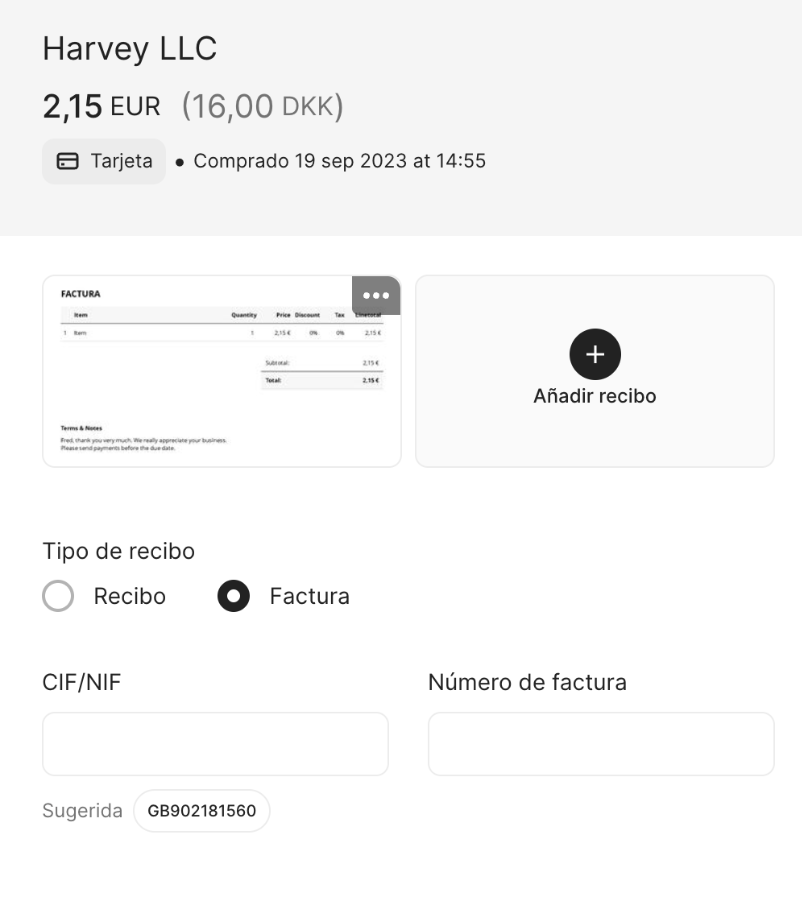
Review the OCR suggestion (receipt or invoice)
If needed, change the selection to Receipt or Invoice
If you select Invoice, Pleo shows extra fields for the information you may need for accounting:
- Supplier tax identification number (NIF/CIF)
- Invoice number
Accept OCR suggestions for invoice fields
If OCR detects an invoice, it will try to extract key fields automatically.
In the expense, check the suggested values for:
i. VAT number (NIF/CIF)
ii. Invoice number
Accept the suggestion if it’s correct
Edit the fields if the suggestion is incomplete or incorrect
Good to know: OCR values are suggestions, not guaranteed matches. If the image is blurry or the invoice layout is unusual, you may need to correct the document type and/or edit the extracted fields
Was this article helpful?
That’s Great!
Thank you for your feedback
Sorry! We couldn't be helpful
Thank you for your feedback
Feedback sent
We appreciate your effort and will try to fix the article
